

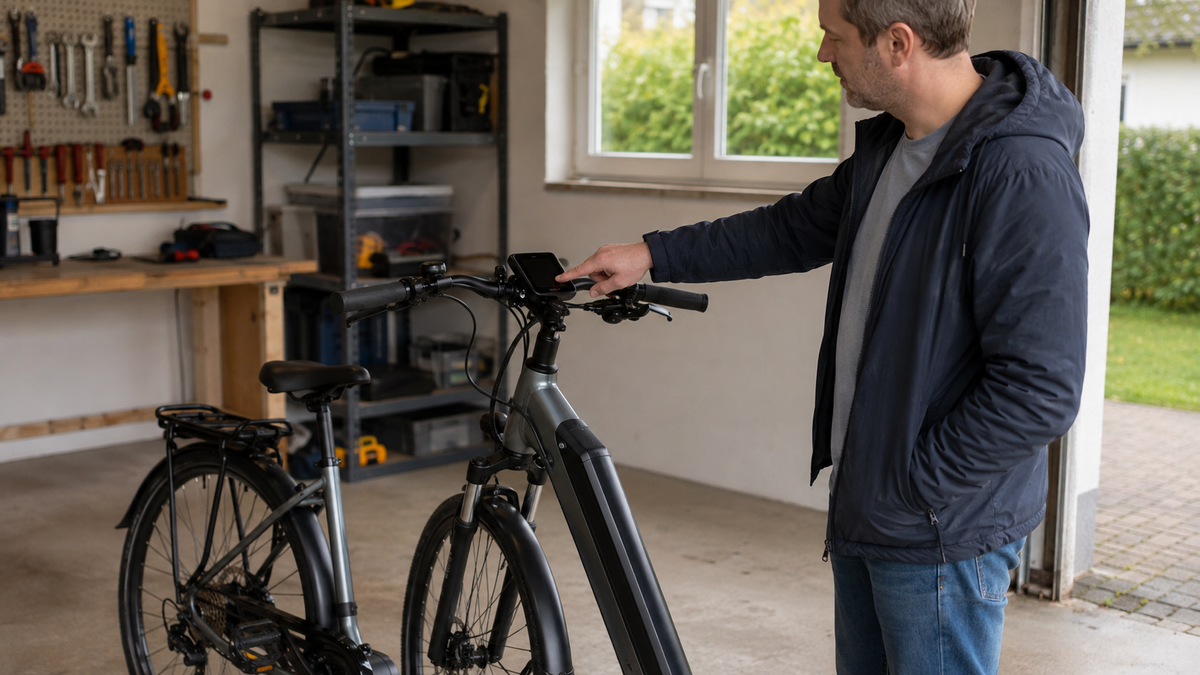
You press the power button, but the e-bike display remains black. This does not automatically mean that the display, battery, or motor is defective. Depending on the system, the cause may be the main battery, a separate display battery, a control unit that is not fully seated, a plug connection, or simply that charging is in progress. A sensible check therefore starts on the outside of the bicycle and ends where the manufacturer's instructions, tools, or safe visibility are lacking.
First park the bicycle safely and assess the situation
Do not try to restart the display while riding. Place the bicycle on firm ground, secure it against rolling away, and remove any luggage that obstructs access. If a charger is connected, do not touch any plug connection with wet hands. In the event of smoke, a pungent odor, unusual heat, deformation, or leaking liquid, stop all checks, keep your distance, and follow the system manufacturer's safety instructions.
Note what happened immediately before the failure: Had the bike been standing for a long time, was it transported, exposed to heavy rain, or was the battery just being charged? Also check whether only the display remains dark or the entire system is unresponsive. The light, button illumination, and battery indicator are useful observations, but not a universal function test; their significance varies depending on the e-bike system.
Distinguish between a black display and a system with no power
| Observation | Possible classification | Safe next step |
|---|---|---|
| Main battery shows no external response | Battery is empty, inactive, or not inserted correctly | Charge only according to the specific battery instructions and check that it is properly seated |
| Battery responds, but the display remains completely dark | Controls, display power supply, or connection affected | Check the specified power-on routine and visible connections |
| The bicycle battery is currently being charged on the bike | System startup may be intentionally locked | End the charging process according to the instructions and try again only afterward |
| The display flickers when the handlebars are moved | The connection or cable may be faulty | Do not move it any further; arrange an inspection at a workshop |
| Heat, odor, smoke, or damaged housing | Possible electrical safety issue | Do not charge or switch on; follow the safety instructions and contact service |
Check the correct power-on sequence
First, use the operating instructions for the system actually installed. Some e-bikes are switched on at the display, others at the battery or via a separate control unit. The required button duration may also vary. Do not press arbitrary combinations or hold buttons down for minutes. A model designation on the display, battery, or purchase documents can help you find the correct instructions.
In its user documentation, Shimano lists several separate causes of a black screen: insufficient charge of the main battery, the power supply being switched off, a power cable that is not connected correctly, a system component that is not detected, or—for certain configurations—the battery mounted on the bicycle being charged. These are diagnostic branches, not a claim that every e-bike responds in the same way.
Check the main battery only from the outside
Check the charge level using the indicator provided by the manufacturer. If the battery does not respond, charge it only with the approved charger, in a dry environment and within the specified temperature conditions. The article E-bike battery not charging describes how to safely inspect the outside when charging does not start. Do not open the battery or charger, and do not bridge any contacts.
If the battery is removable, check that it is seated only as specified in the instructions. Switch off the system first and disconnect the charger. A lock that is not fully engaged, a visibly dirty area, or a foreign object may be noticeable. Do not work on, spray, or bend the contacts with metal tools. If in doubt, leave the battery installed and take the bike to a specialist workshop.

Do not combine charging and switching on
A black display while charging can be normal. Shimano notes for certain systems that the bicycle computer cannot be switched on while the main battery mounted on the bicycle is charging. End the charging process in the order specified in the relevant instructions, remove the charger, and wait the period stated there before making a single start attempt.
If the display remains dark afterward, do not repeatedly try charging, reinserting, and switching it on. Repeated attempts provide little additional information and may further strain a poor connection. Instead, record the charge level, ambient temperature, charger used, and observed indicators for the service team.
Inspect the display, mount, and cables
A removable display may only be detached and reinstalled if it is designed for this and the instructions describe the procedure. Check that it is seated straight and completely in its mount. Some bicycle computers have an internal battery or their own energy storage in addition to the main battery. Whether and how this is charged is model-specific; an arbitrary USB cable or power supply is not a safe diagnostic tool.
Inspect visible cables with your eyes only. Look for pinch points, sharp bends, abrasion, loose-looking connectors, or moisture on the housing. Do not pull on the cable, open any cover, or force a connector together. Flickering when moving it is not a reason to provoke the area further, but useful information for a professional inspection.
How to respond correctly after rain or transport
After heavy rain, leave the parked bike to dry in a dry, well-ventilated place according to the manufacturer's instructions. Do not use a heat gun, direct heat from a radiator, or compressed air on seals and connectors. Do not remove visible moisture beneath a cover not intended for users yourself. After transport, however, first check whether a removable display and the main battery are correctly locked in place and whether no cable has been pinched.
Very cold or warm storage can also affect the battery and electronics. The temperature limits of the specific components are decisive. Do not quickly bring a cold battery up to temperature through intensive heating, and do not start charging until the manufacturer's conditions have been met.
What you should not try as a reset
- Do not bridge contacts with wire, foil, or tools.
- Do not use a battery from an unknown system or one that merely looks similar.
- Do not use arbitrary key combinations from forums as a general factory reset.
- Do not disconnect a plug connection under load or treat it with contact spray.
- Do not open housings or replace an internal display battery without authorization.
A reset can change the error log or settings without resolving the underlying cause. If the manufacturer's instructions specify a defined restart procedure, you can follow that procedure exactly. If no such information is provided, a documented condition is more helpful to the workshop than many unclear attempts.
Better information means faster service
Photograph the display, control unit, battery indicator, and visible cable sections without publicly sharing serial numbers. Note the system name, bicycle model, time of failure, weather, last charging process, and the response to exactly one compliant startup attempt. If a message was briefly visible, write down its exact wording or code instead of trying to interpret it from memory.
A workshop is necessary if a cable is damaged, a plug remains loose, the display flickers, a component is not detected, or the external steps produce no response. The electrical system should also be professionally inspected after a fall or a severe twist of the handlebars. Do not ride with a system whose display of assistance level, speed, or warnings is unreliable.
Frequently asked questions about a black E-bike display
Is the display broken if it does not turn on?
Not necessarily. The power supply, main battery, charging process, control unit seating, and cable connection may also be involved. Only a system-specific diagnosis can distinguish between these causes.
Can I turn on the E-bike while it is charging?
That depends on the system. Shimano describes configurations in which the cycle computer does not start while the installed main battery is charging. Your manual is authoritative.
Can I press a loose display plug back in myself?
Only if it is explicitly described as a user-serviceable connection and you know the correct orientation. Otherwise, pins, the seal, or the locking mechanism may be damaged.
Can I continue riding without a functioning display?
If the electrical system is unclear or safety-relevant displays are missing, you should not rely on motor assistance. Arrange a safe return journey or a workshop inspection in accordance with the bicycle manufacturer's specifications.
Conclusion: check externally and respect system limits
If the E-bike display does not turn on, first park the bike safely and correctly disconnect any charging process in progress. Then check the operating sequence, main battery, designated display mount, and visible cables using the specific manual. Do not open the housing, improvise a reset, or force a plug as a substitute for diagnosis. In the event of damage, flickering, warning signs, or a screen that remains black, leave it to a specialist workshop.
As of September 6, 2026. The startup sequence, charging behavior, display battery, and plug connections are system-specific; the documentation for the E-bike system actually installed is authoritative.
Share:
Bicycle tire not seated correctly: Check the bead and rim seat
Loose bicycle crank: assess the play and prevent damage