

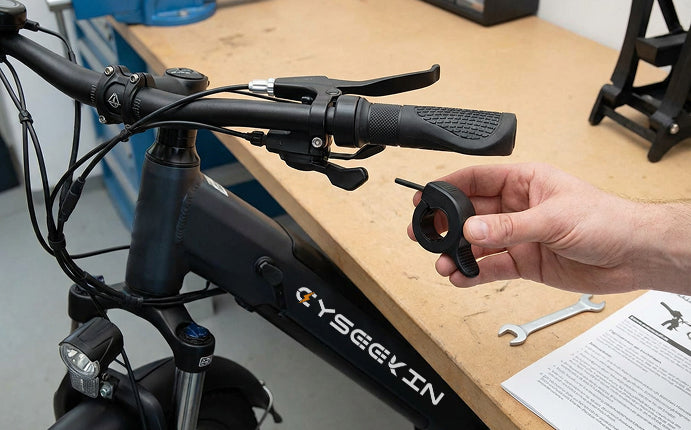
How to Install the Thumb Throttle
All Cyseekin models are equipped with a thumb throttle. If its use is legally permitted in your country or region, the throttle only needs to be connected or installed correctly.
Before use, be sure to check your local laws and regulations. Use may be regulated differently depending on the country or region.
C10
How to Install a Thumb Throttle | Cyseekin C10
Quick guide:
- Switch off the e-bike and place it securely.
- Position the thumb throttle on the handlebar where it is easy to reach.
- Adjust the angle so that it does not interfere with the brake lever or display.
- Tighten the screw without overtightening it.
- Connect the cable properly and check that it is firmly seated.
- Test the function carefully after switching it on.
S10
How to Install the Thumb Throttle | Cyseekin S10
Quick guide:
- Switch off the e-bike and place it securely.
- Mount the thumb throttle on the handlebar in a comfortable position for your thumb.
- Make sure the brake lever, shifter, and grip remain freely movable.
- Tighten the mount.
- Connect the plug and route the cable neatly.
- After switching it on, briefly check the function.
C20
How to Install a Thumb Throttle | Cyseekin C20
Quick guide:
- Switch off the e-bike before installation.
- Attach the thumb throttle correctly to the handlebar.
- Choose a position that allows comfortable operation.
- Secure the screw and check that it is firmly seated.
- Connect the cable and route it neatly.
- Finally, test the function carefully.
C20 – E-mode setting
How do you adjust the finger throttle? | Cyseekin C20
If the throttle is already installed, you can use this video to check the appropriate setting.
- Check whether the throttle is connected correctly.
- Adjust the settings step by step as shown in the video.
- Then test the function at low speed.
If it does not work
Please briefly check the following points:
- Is the throttle correctly positioned on the handlebar?
- Are all screws tightened securely?
- Is the connector fully connected?
- Were the settings applied as shown in the video?
If you still need assistance, please contact Cyseekin Support and, if possible, include a photo or short video. ✉️ Email: support@cyseekinbike.com
Share:
Release and reattach the brake cable on the Cyseekin C10 & S10
Adjusting Brake Disc Noises on the Cyseekin C10